Lyrix · Early access
Build your website by dragging sections, or by asking.
Lyrix is a no-code website builder with an AI agent built in. Edit pages directly on the canvas, or describe what you want and Lyrix AI builds it for you.
Two ways to build
Use the editor, the agent, or both on the same page.
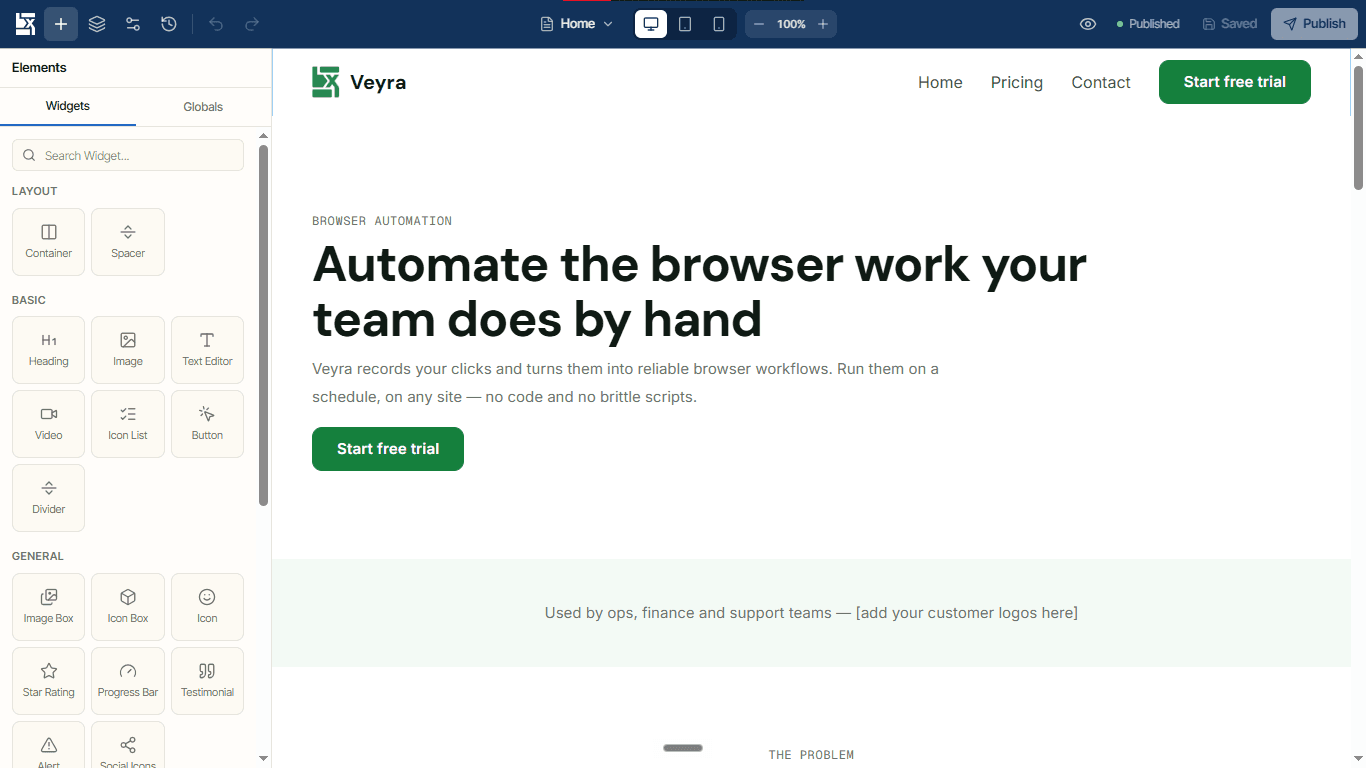
Design it visually
Drag sections, columns and widgets onto the page and edit text where it sits. If you've used Elementor or Webflow, you'll know your way around, with fewer settings to learn.
Describe it to Lyrix AI
Tell the agent what you need. It creates pages, sections and blocks, sets your theme and adds images, and shows you each step as it works.
Visual editor
Everything you need to lay out a page, and not much more.
Edit for every device
Switch between desktop, tablet and mobile, and set spacing, sizes and visibility per device. The canvas uses the same layout rules as the live site, so what you see is what visitors get.
Command palette
Press Ctrl+K to jump to any page, element or action. The layer navigator, right-click menu and keyboard shortcuts cover the rest.
Autosave and version history
Drafts save as you work. Browse earlier versions of a page and restore any of them.
Draft, then publish
Edits stay as private drafts until you publish. Pages and blocks publish separately, and you can preview a draft before anyone else sees it.
Reusable blocks
Save any section as a block and reuse it across pages.
Ready-made sections
Click + Add section to start from a pre-designed layout instead of a blank page.
Lyrix AI
An agent that edits the site, not just the words.
- Creates and edits pages, sections, blocks and your site theme, and adds images. It changes the site itself, not just the text.
- Plans changes that take several steps and asks you questions when it needs an answer.
- Remembers notes about your site and brand between conversations.
- Takes images and files as context, and can search the web when you switch it on.
- Uses skills for focused jobs, starting with SEO.
- Streams each step as it works and sends a browser notification when a long task finishes.
- Ask AI in the editor. Select any element and ask for a shorter, friendlier, more persuasive or translated version of its text.
Example conversation
Site-wide theme
Change it once. Every page follows.
One theme sets your colours, fonts, heading sizes, buttons, spacing and content width. Lyrix loads only the Google Font weights you use, and contrast checks flag text that's hard to read. New sites start from a clean, neutral default.
- Colours
- Fonts
- Heading sizes
- Buttons
- Spacing
- Content width
Widgets and settings
The building blocks, plus the details.
Widgets
- Headings
- Rich text
- Buttons
- Images (auto WebP)
- Dividers
- Navbar
- Forms
- Gallery with lightbox
- Carousel
- Logo cloud
Form submissions land in your dashboard and your inbox.
Settings on every element
- Entrance and scroll animations
- Hover effects
- Background images, colours and gradients
- Shape dividers
- Links on any element
- Show or hide per device
- Sticky elements
- Custom CSS per element
Fast by default
Quick pages without tuning anything.
Rendered on the server
Visitors get finished HTML with almost no JavaScript, so pages load quickly.
Right-sized images
Every image is converted to WebP in several sizes, and each device downloads the size it needs.
Layouts that adapt
Container queries and scaling type keep pages readable from phone to desktop, on one consistent grid.
One dashboard holds all your sites. Each has its own pages, theme, form inbox, AI and settings. Sign in with Google or email.
For developers
Free and open source on GitHub.
Lyrix comes in two editions. Lyrix Cloud is the hosted app with Lyrix AI. The open-source edition is a free Next.js starter you run yourself, with its own editor at /lx-admin that signs in with a Lyrix account.
- Free, open-source Next.js starter
- Editor at /lx-admin
- Sign in with your Lyrix account
Pricing
Try it free. Pay for AI as you use it.
Free
Free to try
Build and preview sites in Lyrix Cloud, or self-host the open-source edition.
Pro
Price at launch
Monthly or yearly billing.
AI credits
Pay as you go
Lyrix AI runs on usage-based credits. Top up when you need more.
Paid plans launch soon. Payments are handled by Paddle.
Coming soon
What we're building next.
- Coming soon
Publish to a Lyrix subdomain
Put your site on the public web at a Lyrix address.
- Coming soon
Custom domains
Connect a domain you own.
- Coming soon
Export
Download your site.
- Coming soon
Paid plans
Full launch of Pro and payments.
FAQ
Questions people ask.
Do I need to code?
No. You can build everything in the visual editor or by asking Lyrix AI. Custom CSS is there if you want it.
How do AI credits work?
Lyrix AI uses credits as it works, so you pay for what you use. When you run low, buy a top-up.
Can I use my own domain?
Not yet. Publishing to a Lyrix subdomain is coming first, then custom domains.
Can I self-host Lyrix?
Yes. The open-source edition is a free Next.js starter on GitHub. It has its own /lx-admin editor and signs in with a Lyrix account.
Will my site work on phones?
Yes. You edit desktop, tablet and mobile views separately, and the canvas follows the same layout rules as the live site.
What happens to my drafts?
They save automatically and stay private until you publish. Version history lets you go back to an earlier version.
Can I manage more than one site?
Yes. One account holds several sites, each with its own pages, theme, forms, AI and settings.
Get early access to Lyrix.
Join the list and we'll email you when your account is ready.